


Spotify has revolutionized how we consume music, offering millions of tracks at our fingertips. However, there’s a significant catch: even with a paid Premium subscription, you never truly own the music you download. Those offline files are encrypted with DRM (Digital Rights Management) and become inaccessible the moment your subscription lapses. For free-tier users, the situation is even more restrictive—offline listening isn’t available at all.
If you’ve ever wanted to permanently own your favorite Spotify playlists, listen offline without a subscription, or transfer songs to an MP3 player, you need a dedicated solution. Enter ViWizard Spotify Music Converter—a professional tool designed to help you download Spotify music without premium and convert it to universally compatible formats like MP3.
Why You Need a Spotify Music Converter
Spotify Free users are limited to online streaming with ads, while Premium subscribers pay monthly for offline listening within the app. Neither option allows you to keep the music files permanently or play them on devices like iPods, Sony Walkmans, car stereos, or smart speakers that don’t run Spotify.
A Spotify music converter bridges this gap by:
- Removing DRM protection from Spotify tracks
- Converting encrypted OGG files to standard formats like MP3, FLAC, and WAV
- Preserving ID3 tags (artist, album, cover art) for organized libraries
- Enabling true ownership—keep your music forever, even after canceling Premium
ViWizard Spotify Music Converter: Your All-in- Solution
ViWizard Spotify Music Converter, one of the best downloader of music for Spotify, is a dedicated software for Windows and Mac that empowers users to download Spotify music without premium subscriptions. It works seamlessly with both Spotify Free and Premium accounts, allowing you to convert any content—songs, playlists, albums, podcasts, and audiobooks—into DRM-free audio files.
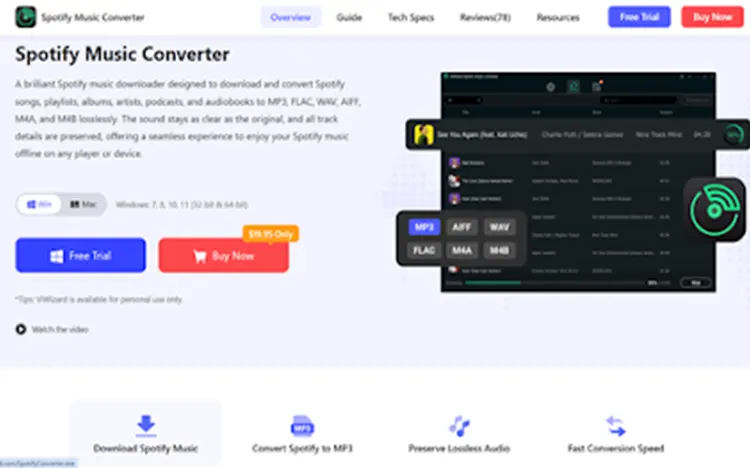
1. Multiple Output Formats
ViWizard supports a wide range of audio formats including MP3, WAV, FLAC, M4A, M4B and AIFF. This versatility ensures compatibility with virtually any device or media player.
2. High-Quality Output at 320kbps
Unlike many free online tools that cap quality at 128kbps, ViWizard maintains the original audio quality—up to 320kbps MP3 with adjustable bitrate and sample rate settings.
3. Fast Batch Downloading
With conversion speeds up to 15X faster, you can download entire playlists or albums in minutes, not hours . The batch processing feature automatically organizes your offline library by artist or album.
4. Complete ID3 Tag Preservation
After conversion, all metadata—including song title, artist name, album artwork, track number, and year—is perfectly retained . Your music library stays organized without manual editing.
5. User-Friendly Interface
Designed with simplicity in mind, ViWizard features an intuitive drag-and-drop interface. Simply copy Spotify links or drag tracks directly into the converter.
How to Download Spotify Music Without Premium Using ViWizard
Getting started with ViWizard is straightforward. Here’s a step-by-step guide:
Step 1: Install and Launch
Download ViWizard Spotify Music Converter from the official website and install it on your Windows PC or Mac. Launch the program and log in to your Spotify account (Free or Premium) in the built-in Spotify web player.
Step 2: Configure Output Settings
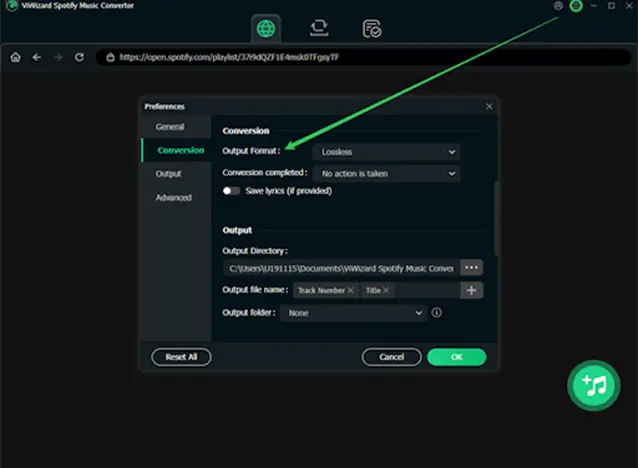
Click the menu icon (☰) in the top-right corner and select “Preferences.” Choose your desired output format—MP3 is recommended for maximum compatibility. You can also adjust audio parameters like bitrate (up to 320kbps), sample rate, and channel settings.
Step 3: Add Spotify Content
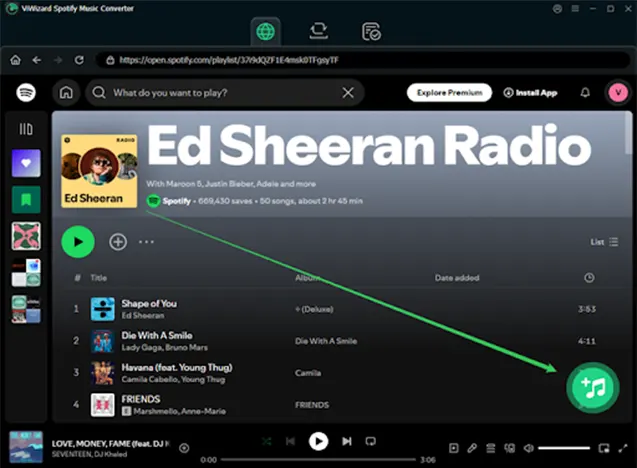
Navigate to the Spotify app or web player. Find the songs, playlists, or albums you want to download. Simply drag and drop them into the ViWizard interface, or copy the Spotify link and click the “Add” button.
Step 4: Convert and Download
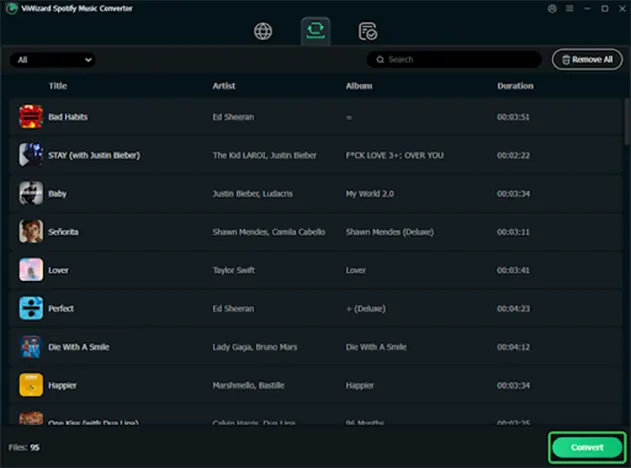
Once your tracks are loaded, click the “Convert” button at the bottom. ViWizard will process your files at high speed, and the DRM-free MP3s will be saved to your specified output folder. You can then transfer these files to any device—no Spotify app required.
ViWizard Pricing and Plans
ViWizard operates on a freemium model. The free trial allows you to test the software, but it limits conversions to 30-second previews or the first minute of each song. For full functionality, paid plans include:
- Monthly Plan: $17.95/month
- Yearly Plan: $49.95/year
- Lifetime License: $89.95 (one-time payment)
- Family plans are also available for multiple users.
Alternative Methods (And Their Limitations)
While ViWizard is the most reliable solution, here are some alternatives:
1. Screen Recording Tools
- You can record Spotify audio using built-in or third-party recorders.
- Downside: Time-consuming and often reduces audio quality.
2. Online Downloaders
- Some websites claim to download Spotify music.
- Downside: Safety risks, unstable performance, and poor quality.
3. Spotify Premium Free Trial
- Spotify offers a temporary Premium trial.
- Downside: Limited duration and still requires payment afterward.
Compared to these options, ViWizard stands out for its efficiency, quality, and reliability.
Final Thoughts: Is ViWizard Right for You?
If you’re tired of Spotify’s limitations and want to truly own your music library, ViWizard Spotify Music Converter delivers a powerful, user-friendly solution. It enables you to download Spotify music without premium, convert to MP3 at 320kbps, and enjoy your favorite tracks on any device—anytime, anywhere.
While the paid version requires an investment, the lifetime license offers excellent value for frequent users. For occasional downloads, consider the trial version or explore free online tools like SpotiDown, but be aware of their limitations in quality, safety, and batch downloading capabilities.
Also Read: This 3D Technology Brings The Music To Your Head – Without Headphones